Click on a question below to view the answer:
- How do I create a notice?
- How do I edit a notice?
- How do I add deadlines or events to a notice?
- How do I display the location of an event on a map?
- I made a mistake, can I delete a notice?
- I've created many notices, how can I quickly find a particular notice?
- What is a template?
- How do I add a user?
- How do I edit a user?
- How do I delete a user?
- How can I keep track of user activity?
- Appendix 1: Notice Field Descriptions
- Appendix 2: Description of Categories
- Appendix 3: Important Category Instructions
-
How do I create a notice?
Important Note: if you are creating an amended notice, you should edit the existing notice instead of creating a new one.
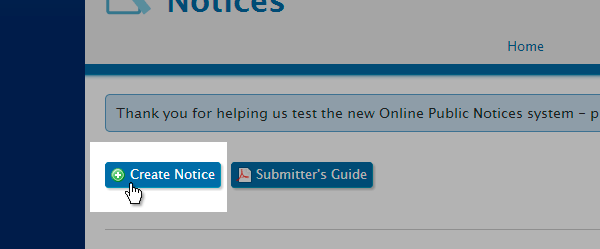
Click the "My Notices" tab and click the "Create Notice" button.
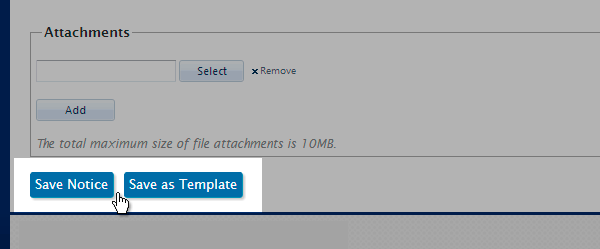
Fill all required fields marked by an asterisk(*) and for better searchability fill as many fields as possible. See the Notice Field Descriptions help topic for detailed information. When finished, click "Save Notice" to create the notice, or "Save as Template" to save the notice as a template for future notices. The new notice should now appear in the "My Notices" tab.
⇑ return to top
-
How do I edit a notice?
Click the "My Notices" tab and click the "Edit" button for the notice that you wish to edit.
A full log is maintained of all changes made to a notice.
⇑ return to top
-
How do I add deadlines or events to a notice?
When creating or editing a notice, go to the "Event/Deadline Details" section near the bottom of the page, then click the "Add New Event" button.
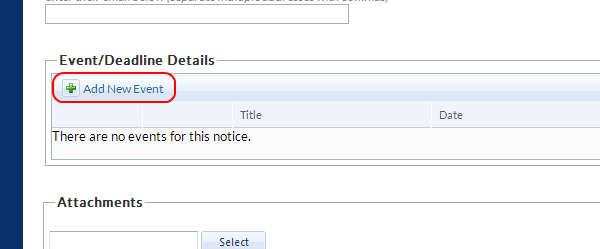
For deadlines (filing deadline, open comment period, etc.), enter the deadline date into the "Deadline or Event Start" field. Leave the "Event End" field blank.
For events (public meeting, etc.), enter the start date & time into the "Deadline or Event Start" field, and the end date & time into the "Event End" field.
Note: events are not saved until "Save Notice" is clicked.
⇑ return to top
-
How do I display the location of an event on a map?
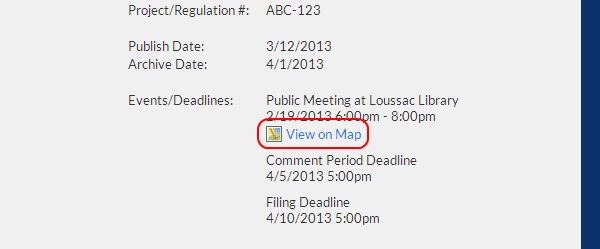
For events, you can display the location on a map. Enter the address only into the address fields. Do not enter the location name (Centennial Hall, Loussac Library, etc.).
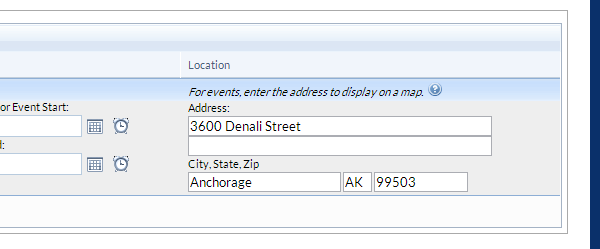
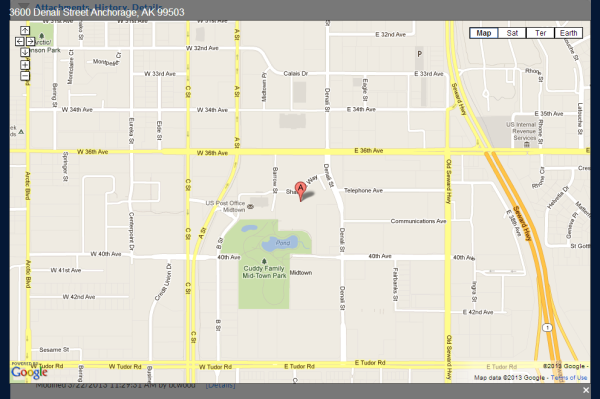
After you have saved the event, be sure to click the "View on Map" link on the View Notice page to make sure the address you entered is actually recognized by Google Maps.
 ⇑ return to top
-
I made a mistake, can I delete a notice?
If a notice has not yet been published then a notice may be deleted by clicking the trash icon in the "My Notices" tab. Only the author of a notice or an administrator may delete a notice. If a notice has already been published, it is a part of the public record and may not be deleted by any user.
⇑ return to top
-
I've created many notices, how can I quickly find a particular notice?
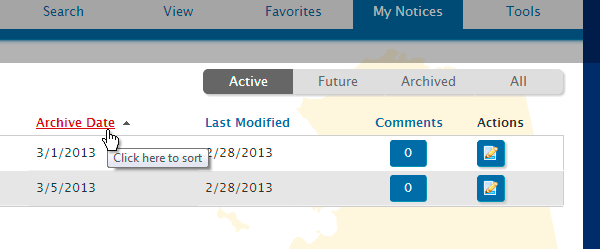
To narrow down the notices displayed in "My Notices" tab you can click the Active, Future, Archived, or All toggle buttons on the top right. Then, to sort columns simply click the title of any particular column.
⇑ return to top
-
What is a template?
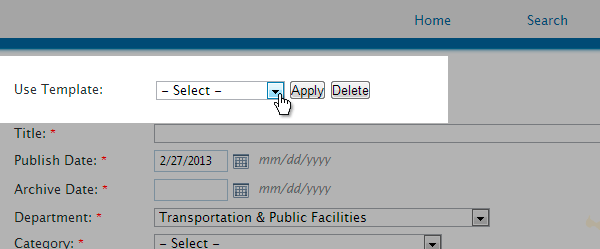
A template is a set of saved fields and values. Templates are useful when creating multiple notices with similar values. A template can be created by entering common field values, clicking "Save as Template" and providing a descriptive name. The template will then be available for loading into any new notice in the"Use Template" dropdown. Select a template and press "Apply." To delete a template, select a template and click "Delete."
⇑ return to top
-
How do I add a user?
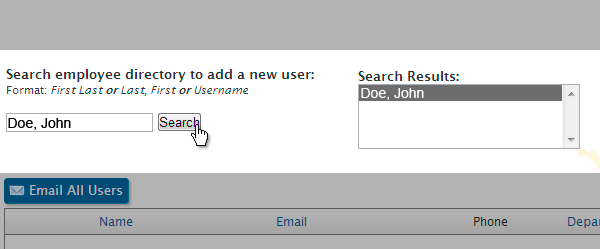
In the "Tools" tab, a Department Administrator may add a user to their region by clicking "Manage Users" then searching for a state employee using the "Search employee directory" box. If matching users are found they will appear in the "Search Results" box.
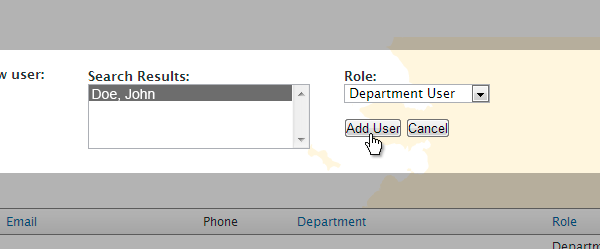
Select the user to be added in the "Search Results" box, select a role from the "Role" dropdown, and click "Add User."
⇑ return to top
-
How do I edit a user?
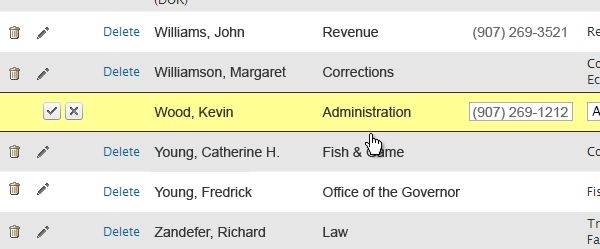
In the "Tools" tab, an administrator may edit a user by clicking "Manage Users", find the user, then clicking the pencil icon for the respective user. Only the users phone number, department, and role type may be changed. Click the checkbox icon to save changes or the X icon to cancel out of edit mode.
⇑ return to top
-
How do I delete a user?
In the "Tools" tab, an administrator may delete a user by clicking "Manage Users" and then the trash icon for the respective user. This will remove a user from the OPN system and all saved searches and favorites. Any notices created by the user will not be affected.
⇑ return to top
-
How can I keep track of user activity?
In the "Tools" tab, an administrator may monitor activity by clicking "User Activity Log" in the Reports section. The log keeps track of user name, action, notice (with link to notice), and the date of the action. Refresh the page to the latest information.
⇑ return to top
-
Appendix 1: Notice Field Descriptions
-
TITLE
Notices should be posted, in general, using the default title case, with the exception of the occasional acronym (see #1). Titles should be descriptive so that the public can determine the subject without viewing the notice. Examples:
Category: Adopted Regulations- Text or Summary of Text:
Title: Psychologist & Psychological Associate Examiners Regulation ChangesCategory: Agency Meeting
Title: Alaska Correctional Industries Commission Quarterly MeetingCategory: Notices of Proposed Regulations
Title: Proposed Regulation Changes Dealing With Certain Shooting Range FeesCategory: Procurement
Title: ITB# 00000 - Knik Arm road resurfacing OR
RFP# 00000 - Gastineau Highway signage OR
RFQ# 00000 - Heated Storage Space for Ketchikan CorrectionalCategory: Public Notices
Title: Notice of Utility Tariff Filing for GCI Fiber Communication Co., Inc. -
PUBLISH DATE
Date which the notice is to be "active" on the Online Public Notice (OPN) system. The default is the current date. You may set the publish date to a future date if you wish. If you set a future date, the notice may only be viewed in the 'Future' view in the "My Notices" until the system automatically publishes the notice at 12:00am on the date specified in the 'publish date' field.
-
ARCHIVE DATE
Date which the notice is no longer visible in the 'Active' view. The notice is automatically set to archived status at 12:00am on the date specified in the 'archive date' field. If the body of the notice refers to a "deadline" date, be sure the archive date is set to at least one day later. Otherwise, the notice will automatically be removed from the 'Active' view before the deadline is reached (example: if deadline is 12/1/2020, 'archive date' should be 12/2/2020 or later).
-
DEPARTMENT
Specify the publishing agency from the drop-down list.
-
CATEGORY
Contains a drop-down listing of OPN categories when creating a notice. If a category contains sub-categories the Sub-Categories dropdown will automatically appear.
The following categories/sub-categories are for use by the Office of the Governor and Lieutenant Governor only (see description of categories):
Executive Orders & Administrative Orders
Regulations / Filed by the Lieutenant Governor -
SUB-CATEGORY
Sub-categories are optional.
-
LOCATION
Allows an agency to identify a community, communities or region(s) affected by the notice and whether a hearing will be by teleconference or videoconference. If a notice is not specific to one area, then "statewide" should be selected.
-
PROJECT/REGULATION #
Reference a project or regulation number for enhanced searchability.
-
BODY OF NOTICE
A notice must include the following information:
Explanation of subject
Hearing information (if applicable)
Agency Staff Contact
If meeting, agenda item(s), place, time, video/audio teleconference locations if applicable
ADA (American Disabilities Act) information
- The body of the notice is saved in HTML format. You can apply formatting to the body of the notice by using the formatting toolbar. Copying and pasting the body of the notice from a word processor will preserve the formatting, hyperlinks, etc.
-
 Provides spellchecking functions
 -
 Bold text formatting
 -
 Italic text formatting
 -
 Underline text formatting
 -
 Numbered list
 -
 Bulleted list
 -
 Left justify text
 -
 Center justify text
 -
 Right justify text
 -
 Indent text
 -
 Remove indentation
 -
 Insert hyperlink
 -
 Remove hyperlink
 -
 Insert table
 -
 Remove table
-
- Edits to an existing notice can only be made by the author, a user from that department, or a Public Notice Administrator.
- Deletion of a published notice, or changes to an archived notice can only be performed by a Public Notice Administrator.
- Please check with agency procurement officer(s) for standards concerning "procurement" notices (i.e.: requests for proposal, invitation to bid, requests for quotation, awards, etc.).
- Meetings and/or deadline dates should also be entered into the "Event/Deadline Details" section.
- The body of the notice is saved in HTML format. You can apply formatting to the body of the notice by using the formatting toolbar. Copying and pasting the body of the notice from a word processor will preserve the formatting, hyperlinks, etc.
-
ATTACHMENTS
The system can accommodate an unlimited number of file attachments per notice. However, the system enforces a limit of 10MB per upload. In other words, the sum file size of all attachments in a single "Save Notice" action must not exceed 10MB. To upload more than 10MB repeat the upload process. Use the "Attachments" section to select/manage attachments. Click the "Add" button to select another file for upload.
Note: attachments are not uploaded or removed until "Save Notice" is clicked.
-
-
Appendix 2: Description of Categories
-
AGENCY MEETINGS
When a governmental body of a public entity meets to conduct business, public notice must be provided a reasonable time in advance of the meeting. Public notice must include the date, time, and place of the meeting and, if the meeting is to be teleconferenced, the location of teleconference facilities that will be used. See AS 44.62.310. Notice of a meeting is to be given, even if the meeting has been held. For meetings pertaining to a specific board or commission please post under the “Boards and Commissions” category and applicable sub-category field.
-
ATTORNEY GENERAL OPINIONS
Summary of the text of recently issued formal opinions or memoranda of advice issued by the attorney general, including advisory opinions issued by the attorney general under the Executive Branch Ethics Act (AS 39.52).
-
BOARDS AND COMMISSIONS
- Information on when a specific board or commission intends to meet.
- A list of the vacancies on boards, commissions and other bodies whose members are appointed by the governor. Vacancy information is compiled by the Office of the Governor's staff.
-
DELEGATIONS OF AUTHORITY
Delegations of authority include:
- cases where the commissioner of a department delegates his/her authority to someone to carry out the responsibilities of commissioner; and
- cases where the head of a division or agency within a department delegates his/her authority to enter into contractual agreements, sign regulations, and the like.
"Standing delegations" should only be published once each year. If that delegation changes during the year, a description of the change(s) should be submitted for publication only one time.
-
EXECUTIVE ORDERS AND ADMINISTRATIVE ORDERS
Executive orders and administrative orders signed by the governor.
-
GRANTS
Grants to named recipients (AS 37.05.316)
-
MEDIA RELEASE
Notices for release to public media outlets.
-
PROCUREMENT
Includes notice of competitive sealed bids and proposals for the procurement of supplies, services, lease space and professional services with an estimated value of $50,000 or more, and construction with an estimated value of $100,000 or more.
Notice of other solicitations that must be published include:
- Alaska Housing Finance Corporation disposal or sale of surplus properties under AS 18.55.255 and 18.55.320;
- disposal of timber and other materials by Department of Natural Resources by sale or auction under AS 38.05.120;
-
PUBLIC NOTICES
ALL public notices that appear in any newspaper in Alaska (i.e., public announcements, press releases, hearings) which are not otherwise covered under one of the On-Line Public Notice categories should be published.
-
REGULATIONS / FILED BY THE LIEUTENANT GOVERNOR
A list of regulation projects (permanent, emergency, and emergency being made permanent) which have been adopted by agencies, filed by the Lieutenant Governor and prepared for publication in the most current supplement (Register) to the Alaska Administrative Code. List includes the name of the department, attorney general's file number, date regulation filed, effective date, subject and AAC chapter number(s). This information is compiled by the Lieutenant Governor's Office staff.
-
REGULATIONS / NOTICES OF PROPOSED REGULATIONS
A state agency must notify the public of its intent to adopt, amend, or repeal a regulation. Public notice must be given at least 30 days prior to formal action and provide the following information:
- an informative summary of the proposed regulation to be adopted, amended or repealed;
- the statutory authority under which the regulation is adopted, amended or repealed;
- cost impact statement;
- the time and place of a public hearing where oral or written comments can be given; or, if a public hearing will not be held, a specific deadline date and address for receipt of written comment.
The full text of the proposed regulation(s) is not generally printed. Instead, agencies should include a link to the proposed regulations, if possible.
-
REGULATIONS / TEXT OR SUMMARY OF TEXT
After the public hearing/comment period, the agency reviews both oral and written comments and decides whether to amend a proposed regulation, adopt it as written, or terminate the promulgation process. If the agency decides to adopt the regulation, an adoption order and the regulation is sent to the Department of Law for review and forwarding to the Lieutenant Governor for filing.
State statute (AS 44.62.175(a)(7) requires that agencies publish the text or summary of the text of a regulation or order of repeal of a regulation for which notice is given under AS 44.62.190(a). This provision is not clearly worded, but has been interpreted to require "after-the-fact" notice in the journal that the regulation-adoption process has been completed for a proposed regulation and that the regulation will be taking effect. To facilitate compliance with the requirement, the agency should include a brief summary of any regulation THAT HAS BEEN FILED, including the effective date.
-
-
Appendix 3: Important Category Instructions
Notices Of Proposed Regulations And Adopted Regulations - Text Or Summary Of Text
The body of "Notices of Proposed Regulations" sets out two items, both of which an agency must issue as required by the Administrative Procedure Act (AS 44.62) when proposing and adopting regulations: [1] a public notice of proposed regulations; and [2] so-called "additional regulations notice information". When setting out the body text for "Notices of Proposed Regulations", please check that the agency staff person responsible for the proposed regulations has provided both a copy of the public notice and a copy of the "additional regulations notice information". Please set out the public notice and the "additional regulations notice information" in the body of the online notice. Do not use hyperlinks or electronic attachments to access these items.
Also, "Notices of Proposed Regulations" does not, and should not, include a copy of the proposed regulations themselves, either in the body of the notice or as an electronic attachment. However, an agency may post a copy of the proposed regulations on their webpage and hyperlink to the online public notice (see 9e above for instruction), and are strongly encouraged by the Department of Law and Lt. Governor's Office to include a link of this sort. Please contact our office if you are unclear as to the difference between a link and an attachment.
When entering the archive date for a notice of proposed regulations, the archive date must be later than the end of public comment date.
Notice on the Alaska Online Public Notice System should not be confused with a direct e-mail notice to incumbent legislators and interested persons, as required by ch. 107, SLA 2000 for the notice of proposed regulations and "additional regulations notice information". The requirements for furnishing direct electronic notice under that act vary somewhat from the requirements for posting notice on the Alaska Online Public Notice System.
If your agency has assigned you not only to post notice on the Alaska Online Public Notice System but also to furnish electronic notice directly to incumbent legislators and interested persons, the Department of Law has prepared instructions regarding any use of "links" in the direct e-mail notice. Please contact the Lieutenant Governor's office for a copy of those instructions. For additional questions, please contact Steve Weaver, Assistant Attorney General, at the Department of Law's Legislation/Regulations Section, 465-3600.